


Soar AI: Video Generator
3.597.00 Reviews
App Specs
- Version
- 1.0.42
- Updated On
- License
- Free
- Downloads
- 100,000+
- Developer
- SooXT
- Categories
- Art & Design
- Platform
- Android
Screenshots
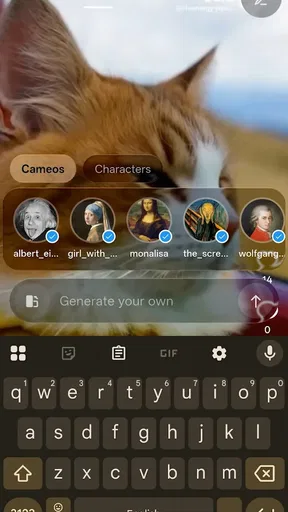




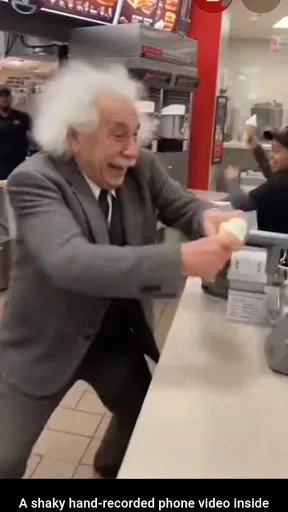
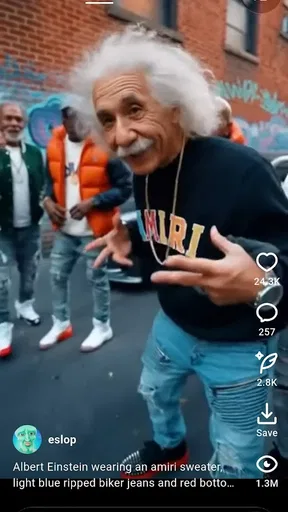

 Analysis by AppCompare
I see Soar AI: Video Generator as an idea-first tool: its appeal is turning a written prompt into a video, not replacing a full editing suite. That makes it worth considering when you want to explore a visual concept quickly, but it also sets a sensible expectation. AI-generated results are starting points to judge and refine, not a guarantee that every detail will match what you pictured.
Where a text prompt fits into a real workflow
Text-to-video is most useful when you have a mood or scene in mind but lack footage, drawing skills, or time to assemble visuals from scratch. I’d use it to test a few directions for a short social post, create a moving backdrop for an announcement, or sketch out the look of a project before committing to a more involved production. The key is to treat the prompt as a creative brief: describe the subject and atmosphere clearly, then decide whether the result actually serves your purpose.
A practical approach is to begin with one central idea rather than a crowded list of demands. If a prompt asks for several actions, locations, and visual styles at once, the result may be harder to evaluate. I’d make a simple first attempt, note what feels wrong, and revise one element at a time. That makes it easier to learn which wording steers the output and avoids confusing a change in subject with a change in style.
A useful companion, not an all-purpose editor
It helps to distinguish generating a video from finishing one. A prompt-based app can offer a fast route from concept to moving image, while a conventional mobile editor is usually the better choice when you need precise cuts, carefully timed captions, or a deliberate sequence of your own clips. If the goal is to tell a specific story with real footage, I’d start in an editor. If the goal is to see an idea visualized without gathering footage first, Soar AI is the more natural experiment.
That difference matters for everyday sharing. Imagine you have a small business announcement to post but no fresh product footage. You could use a generated visual as a draft or attention-grabbing background, then check whether it represents the announcement accurately before sharing. For anything where the exact appearance of a person, place, or product matters, I would not assume an AI-made scene is a faithful substitute for a real recording.
Who is likely to get the most from it?
I can see the strongest fit for curious beginners, social media users with a visual idea but no editing routine, and creators who want to explore alternate treatments before producing a polished piece. It can also suit someone who prefers starting with a sentence instead of learning a timeline-based editing workflow. If you need dependable control over every shot, detailed post-production, or a video that must document real events accurately, I’d choose a dedicated editor or camera footage instead.
Before relying on any generated clip for a public-facing project, I’d review it with the same care I’d give a draft design. Check whether the main subject reads clearly, whether the mood fits the message, and whether anything in the image could mislead viewers. This quick review step is especially worthwhile for promotional or informational posts: a striking visual is only useful if it supports what you are actually saying.
Worth Reading Before You Choose

EA SPORTS FC Mobile 26 Is a Bigger Football Game, but It Takes Time

Flipboard Shows What News Apps Must Do Beyond the Feed

Switching to Android Auto Means Rethinking Your Driving Routine

Google Calendar Makes a Crowded Week Easier to Manage

Ludo King Makes the Most of the Minutes Between Plans

Baby Panda World Brings Quick Play to Modern Phones, but Its Game Library Feels Busy
What is Soar AI: Video Generator?
Soar AI: Video Generator is an innovative app designed to simplify video creation. Whether you're a pro content creator or just someone looking to spice up your social media, this app offers a range of tools to make your videos stand out. It leverages AI to help users generate videos quickly and efficiently, which is perfect for our fast-paced world.
Diving into the Features
One of the first things I noticed was how intuitive the interface is. You don't need a PhD in computer science to figure it out. The app is structured in a way that makes navigation a breeze. Let me break down some of the standout features:
- AI-Powered Editing: The app uses AI to automatically edit your videos, ensuring smooth transitions and professional-grade quality. It's like having a personal editor in your pocket.
- Template Variety: There are numerous templates to choose from, each catering to different styles and themes. Whether it's a travel vlog or a cooking tutorial, they've got you covered.
- Music and Effects: The app comes loaded with a library of music tracks and effects. It’s super easy to add that extra flair to your creations.
- Real-Time Preview: This feature allows you to see changes in real-time, which is great for making quick adjustments on the fly.
Getting Started
Setting up the app was as straightforward as it gets. After downloading, I was guided through a short tutorial that explained the core functionalities. The tutorial was concise but thorough, which I appreciated. It meant I could jump right into creating without any hiccups.
The User Experience
Using the app was seamless. The AI editing feature saved me tons of time, especially when I was in a rush to post a video on social media. I loved how the app suggested edits and effects that I might not have thought of myself. It's like having a creative partner who constantly thinks outside the box.
However, there were moments where I wished for more customization options. While the AI does a fantastic job, sometimes a human touch is needed to make a video truly unique. That said, the developers seem to be actively updating the app, so I'm hopeful for more advanced features in the future.
Checking fit before you commit
For a casual creator, the most useful question is not whether AI can make a video, but whether the result is usable for the particular job. I’d judge a draft on clarity, tone, and whether it gives viewers the right impression. If it is only a personal experiment, an imperfect detail may be harmless. If it represents a service, product, or real place, small visual inaccuracies can matter more than polish.
Another practical trade-off is creative control. Automated suggestions can help when you are staring at a blank screen, yet they may steer a clip toward a familiar, generalized look. To make the result feel more personal, I’d use a distinctive subject, setting, or mood in the prompt and keep the message focused. Then I’d compare the generated result with a simple version made from my own images or footage. That comparison can reveal whether generation saved effort or merely added another step.
Questions worth considering before making it a habit
Is it a replacement for a conventional editor? In my view, no: it is better approached as a way to develop a visual idea, while a timeline editor remains more suitable for precise assembly and finishing. Is it a good fit for someone with no video experience? The approachable design described in my use makes it less intimidating, but beginners still need to assess whether the output communicates what they intended.
Would I use it for every post? No. When a phone recording or a few still images tell the story directly, those can be clearer and more authentic than an invented scene. I’d turn to text-based generation when the concept is more important than documentary accuracy, or when I want to explore a look before deciding how to produce it. That distinction keeps the tool useful rather than making it a default for work it is not suited to.
Availability and overall value
In the art and design space, SooXT’s app is free to download, carries an Everyone age rating, and has reached over 50,000 installs. It has a 3.7 average from around 574 ratings, a useful indication that people have tried it, though I would not treat a score as a substitute for deciding whether its prompt-led approach suits my own projects. Version 1.0.23 supports Android 7.0 and later, making it accessible on a broad range of Android devices.
I’d recommend trying it when you have a specific scene or visual mood you want to explore, rather than expecting it to handle a complete production from idea to final cut. Creators who need exact control, consistent brand details, or reliable footage of real-world subjects should lean on their usual editing tools. For quick creative exploration, though, the low barrier to starting is the point: I can test an idea, judge the result, and decide whether it deserves more work.
Perfect for Content Creators
If you're someone who regularly creates content, Soar AI: Video Generator could become your new best friend. The app makes it super easy to produce high-quality videos without spending hours in front of a computer. It's especially handy for those who travel a lot and need to edit on the go.
Wrapping Up
In conclusion, Soar AI: Video Generator is a fantastic tool for anyone looking to elevate their video content. Its combination of AI technology and user-friendly design makes it accessible to both beginners and seasoned creators. While there are a few areas for improvement, the app's core functionalities are solid, and it has the potential to become a staple in the video editing world.
If you’re ready to take your video creation game to the next level, give this app a try. You might just find it as indispensable as I do.
Pros
- Intuitive user interface for easy navigation.
- High-quality video rendering capabilities.
- Wide range of templates for quick creation.
- Regular updates with new features.
- Strong community support and tutorials.
Cons
- Requires a stable internet connection.
- Some features locked behind a paywall.
- Occasional bugs with specific formats.
- Limited export options in free version.
- Ads can be intrusive during use.
FAQs for Soar AI: Video Generator
What is Soar AI: Video Generator and how does it work?
Soar AI: Video Generator is an innovative app designed to help users create videos using AI technology. It allows you to input text prompts and select themes, which the AI then uses to generate high-quality video content. The app simplifies video creation, making it accessible even to those without prior editing experience.
Is Soar AI: Video Generator free to use?
Soar AI: Video Generator offers a freemium model. Users can access basic features at no cost, but there are premium features available for purchase. These may include advanced editing tools, higher resolution outputs, and additional themes. It's worth checking the app's pricing page for the latest subscription details.
What are the system requirements for Soar AI: Video Generator?
For optimal performance, Soar AI: Video Generator requires a smartphone with at least 3GB of RAM and a recent version of Android or iOS. Stable internet connectivity is also recommended, as the app relies on cloud-based AI processing to generate videos. Ensure your device software is up to date for the best experience.
Can I customize the videos generated by Soar AI?
Yes, Soar AI: Video Generator offers various customization options. Users can choose from different themes, adjust text overlays, and select music tracks to enhance their videos. The premium version provides even more customization features, allowing for greater creative control over the final output.
Is Soar AI: Video Generator suitable for beginners?
Absolutely! Soar AI: Video Generator is designed with user-friendliness in mind. Its intuitive interface guides beginners through the video creation process, while the AI handles the complex editing tasks. This makes it an excellent choice for anyone looking to create professional-looking videos with minimal effort.


